Category: Big 6
Save Your Nearpod Lessons by June 30
Due to funding changes, Utah is transitioning to the Nearpod Platform Package. Nearpod remains free, and you will not lose your created lessons, but access to the premade Nearpod Lesson Library, Math/Social Studies Programs, and shared School/District Libraries will end.
🛑 Teacher Action Required By June 30
To keep your instructional materials for next year, you must manually save them to your personal account:
-
Move Shared Content: Copy any crucial lessons out of your School/District Shared Libraries and into your personal account.
-
Add Library Lessons: Download any global Nearpod Library lessons you want by adding them to your account and making a quick edit (e.g., renaming it to "The 2026 Olympics - Smith").
-
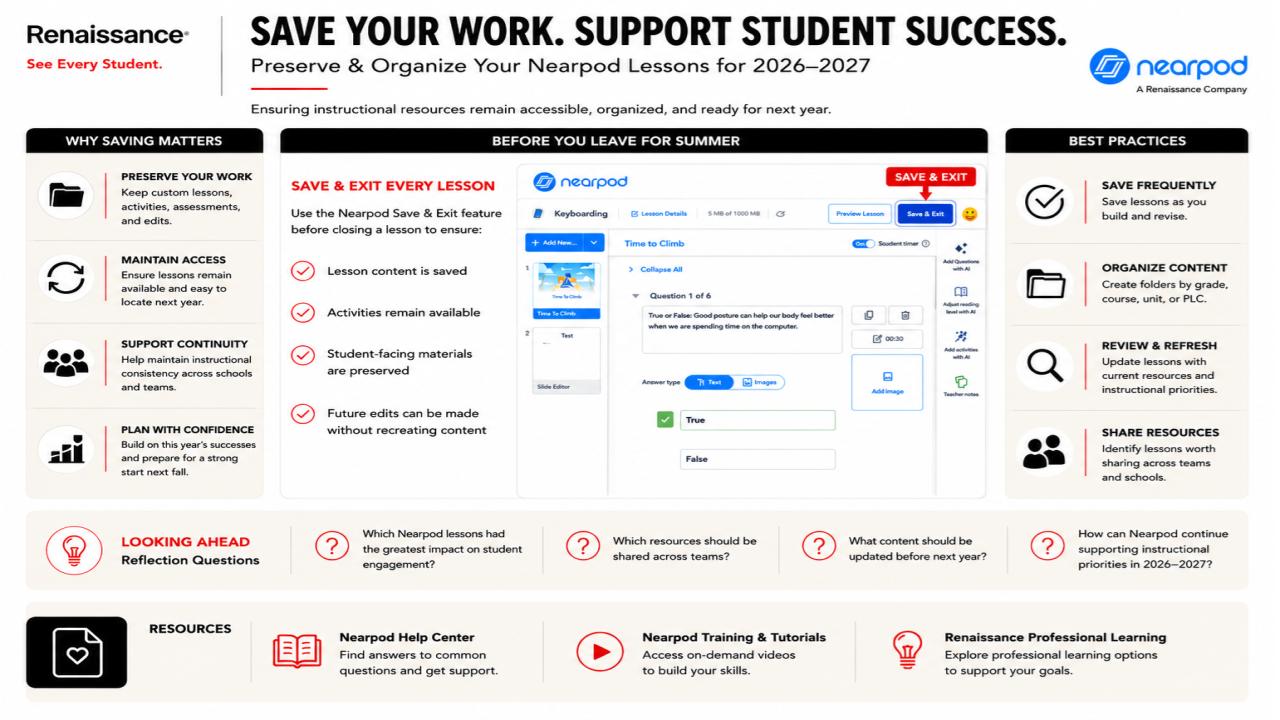
Save & Exit: As detailed below, always use the "Save & Exit" feature to fully preserve your content, activities, and future editing capabilities.
Refer to the following guide for best practices on organizing your folders and refreshing your content before leaving for the summer.
☀️ Summer of Learning with Google

☀️ USBE / Google For Education Summer 2026 Training Series
USBE and Google for Education have developed a training series this summer for our Utah K12 and Higher Education groups. This training is free and open to any educator in Utah. Google is targeting three groups for this training series:
- Educational leadership from Superintendents to Principals to Deans and Presidents. This program is a fully virtual program that shares information on policy, rollout, and developing supports for AI within your organization.
- English Language Arts, Math, and Science secondary educators or introductory college course instructors/professors. This program is an 8-week course with 7 virtual weeks and one two-day session in person to develop a best practices program around AI. This program is limited to 200 people.
- Third, IT professionals either in K12 or Higher Education. This program will include time to ask questions with the Google Engineering team.
You can use this site to register for the training, but more resources will be added in the coming weeks: https://sites.google.com/schools.utah.gov/aitraining2026/home

☀️ Google and ISTE+ASCD AI Educators Microcredentials
The AI skills you need, delivered the way you need them. The Google AI Educator Series provides free, standards-aligned AI literacy training for every educator across K-12 and higher education. Learn from Google through bite-sized sessions designed to meet your schedule, and earn digital badges along the way. Spend the summer growing your Googleyness by earning the first half of the set with more to be released on September 2. Try them out: Google AI Educator Series

☀️ FREE Google Certifications
Google Certified Educator Level 1, Level 2, and Gemini Certification Exams are now free of charge indefinitely! Start your journey today: https://educertifications.google/
Nearpod News- June 2026
Adobe Update: June 2026
As we head into the final weeks of the school year, our classrooms are buzzing with collaborative energy. This month, we are focusing on a vital characteristic of our district’s Portrait of a Graduate: Responsible Teammate.
The Definition: "As responsible teammates, we demonstrate dependability through positive collaboration with others and a commitment to diligence in our everyday actions."
Being a responsible teammate goes beyond just "helping out"—it’s about being a person others can count on to show up, do the work, and celebrate the collective success of the group.
Feature Spotlight: Classroom Gallery Walls
To support this commitment to collaboration, we are spotlighting the Classroom Gallery feature in Adobe Express. This tool creates a shared digital space where student work lives together, fostering a sense of community and mutual respect.
How it works for your classroom:
- Create a Shared Space: Teachers can create a "Gallery" for a specific project or unit.
- Collaborative Contribution: Students add their own Adobe Express designs, videos, or pages to the gallery with a single click.
- Real-Time Updates: As students refine their work and resubmit, the gallery updates automatically, showing the progress of the entire team.
Try it Today!
Ready to build your first digital wall? Head to the Classrooms tab in Adobe Express and select "Create Gallery." Whether you’re showcasing end-of-year digital yearbooks, science fair posters, or creative writing portfolios, use the gallery to celebrate the hard work and responsibility your students have shown all year long.
For more info, check out this Big 6 in 60 video:
Or this Adobe help page: https://helpx.adobe.com/express/web/adobe-express-for-education/for-educators/create-and-manage-classroom-galleries.html