Are you struggling to see a Canva design shared with you?
Use the following graphic to help you troubleshoot the problem.
Why Can’t I See A Canva Design? by melanie.leavitt
Jordan Teaching & Learning
Are you struggling to see a Canva design shared with you?
Use the following graphic to help you troubleshoot the problem.
Why Can’t I See A Canva Design? by melanie.leavittWe know how much you and your students love using Canva to bring creativity to the classroom. To make collaboration even smoother, we have a quick but important reminder about how we organize our Canva teams.
Why the Switch?
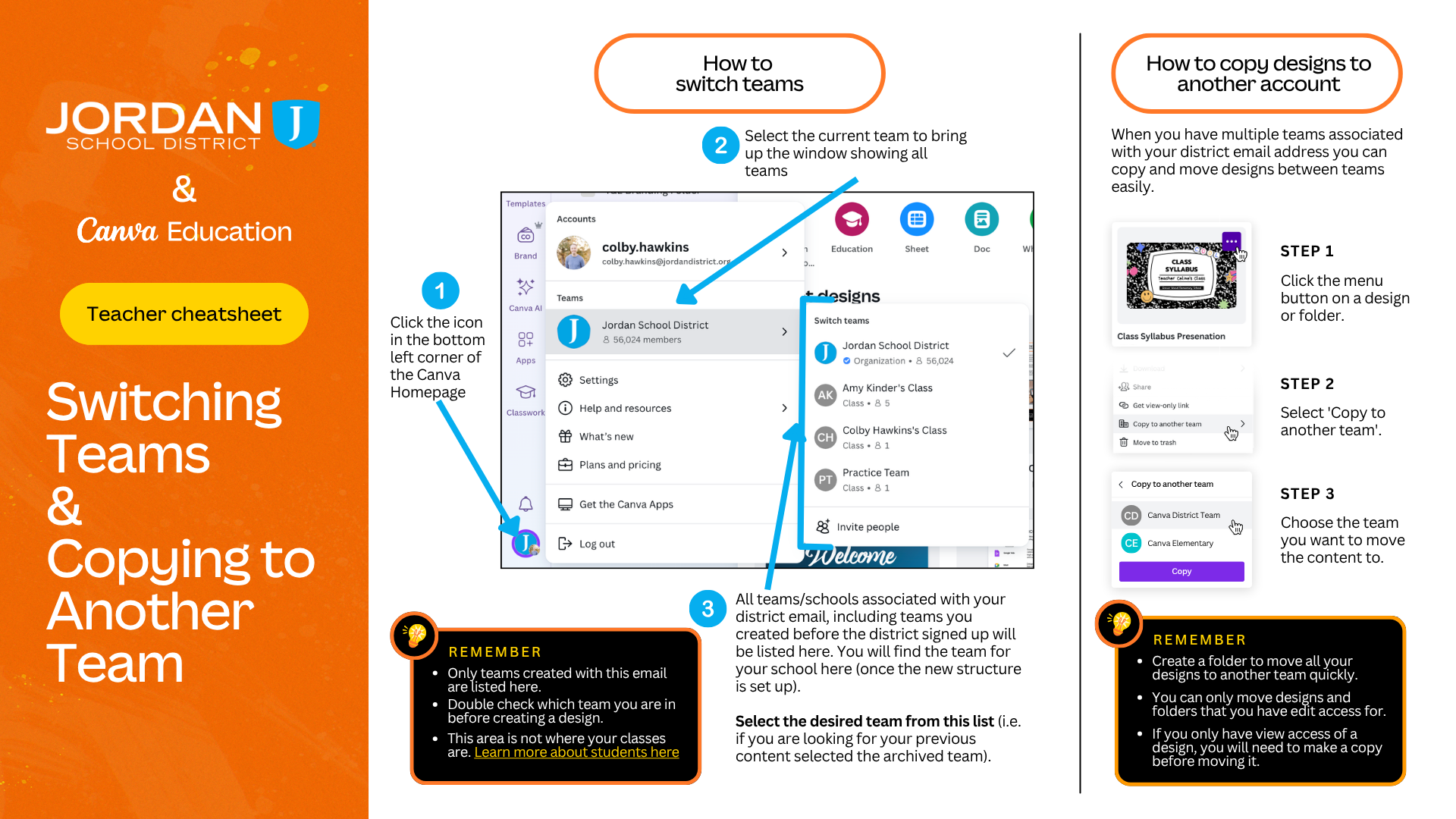
Back in the Fall of 2025, we updated our Canva structure so everyone is grouped into individual school teams rather than one massive district-wide team.
While anyone who used Canva prior to the switch will have continued access to the now Archived Jordan District team, anyone new to our district does not get that access. Because students cannot share outside their specific team, working out of the archived district team creates sharing roadblocks. If you or your students are still working in the archived team, assignments and group projects can easily get stuck.
By ensuring your account and your students are working from your current school team, you’ll instantly eliminate those sharing frustrations and ensure everyone can collaborate seamlessly.
Check out this month's slide deck to see the latest Canva tools currently available. The slides highlight some of the best AI tools to integrate into your daily teaching workflow:
Explore the slides to learn more. Also stay tuned as major upgrades have been announced with the coming of Canva AI 2.0 in the coming months!
Latest AI updates with Canva by colby.hawkinsReady to see what’s new in your digital ecosystem? We have some fresh AI updates to share regarding our Big 6 tools that will change the way you and your students create, collaborate, and learn!
April 24th Lunch & Learn- Big 6 AI Updates by kelli.cannon