
Check out one of Canva's latest features, Live Learning sessions. This feature is a fast reliable way to bring every student into a shared activity, ready to create, collaborate, and learn together in seconds. Check out the slide deck below to learn more.
Introducing Canva Live Learning Sessions by colby.hawkinsCategory: Big 6
Ignite AI
Unify AI tools into one cohesive user experience.
AI can do amazing things for educators and students—if it’s aligned with the way you teach. IgniteAI brings robust AI tools into the places where teaching and learning happen every day, providing full control and visibility over how and when they’re used.
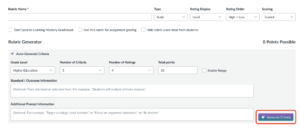
Rubric Generator
Go to an Assignment, then add a Rubric, and then you'll see this:
Discussions
Go into a Discussion that's been made, and there, you'll see the summary, insight, and translation features:

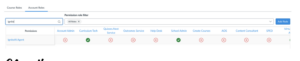
Announcement & Discussion Translation
As highlighted above, Discussions get translations, and so do Announcements. Just like Discussions, you have to go into one and there you'll see this:
February Expedition Schoolai
Here is the latest newsletter for February. Take some time to check it out.
2025-26 Schoolai Journey by dtaylorAdobe Update: Feb 2026
Engage Your Student Citizens with a Media Diet Reflection
This month for our Adobe Update we are excited to share a dynamic new project using Adobe Express: Design a Web Page to Reflect on Your Media Diet perfect for developing Engaged Citizens.
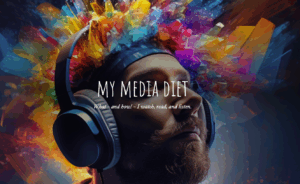
In this activity, students analyze their own media consumption, reflect on how information shapes their views, and then use Adobe Express to design web pages that visually represent their findings. This creative process builds critical media literacy, helping students understand the sources and impact of their daily information intake.
This project directly supports the Engaged Citizen element in our Portrait of a Graduate. By examining the role of media and sharing their reflections with peers, students learn to be informed, thoughtful participants in their communities. They develop the ability to question, evaluate, and act responsibly in a digital world—essential skills for contributing meaningfully to society now and in the future.
Adobe Update: Jan 2026
This month’s resource is a powerful recorded session from Adobe’s Creative Community Week titled, “Prompting for Equity: A Hands-On Look at AI Bias” with Shira Moskovitz.
This session guides educators through using Adobe Express’s AI image generation to explore the concept of AI bias in a vivid, accessible way. Participants learn how hidden biases can appear in AI-generated images, why this happens, and strategies for designing prompts that promote more inclusive and equitable results. The session also includes a ready-to-use classroom activity!
Regarding our PD focus this month on Digital Equity, this session is a timely resource for helping all students gain equal access to key digital tools and skills. Digital Equity=Ensuring all students can fully benefit from technology, regardless of background.
By teaching students to recognize and challenge bias in AI, we’re not just building technical know-how—we’re empowering them to be ethical, engaged citizens, as outlined in our Portrait of a Graduate. When students understand the importance of fairness and inclusion in technology, they’re better equipped to participate meaningfully in today’s digital world.