
The modernized Mastery Connect user experience delivers a sleek, responsive interface rebuilt for full accessibility (WCAG 2.1 AA). Redesigned Trackers, Assessments, and Curriculum Maps feature faster workflows, keyboard navigation, enhanced screen reader support, seamless Canvas integration, and simple view toggling for educators.
Category: MasteryConnect
Updated User Experience for Mastery
Accessibility is an increasingly important priority for districts as they navigate compliance requirements, procurement reviews, and inclusive instructional practices. Starting July 1, 2026 you will see the feature on your Mastery and Canvas integration.
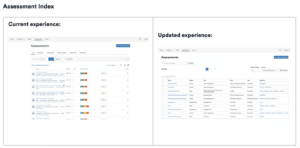
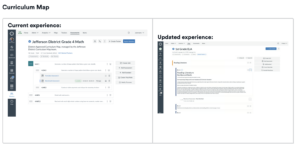
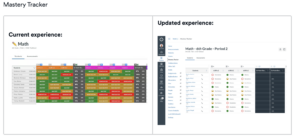
Editing an assessment in Mastery Connect
Editing an item or assessment in Mastery
Editing an assessment or an assessment item in Mastery is often desired for a particular outcome, but not as easy as you would like. But there is a reason. Mastery Connect prevents you from editing assessment questions after they have been given to ensure data integrity and fairness.
- Accuracy of Results: If you change a question, the scores already recorded would no longer accurately reflect how students performed on the original version of that question.
- Fairness: Allowing changes mid-stream could give an unfair advantage to students who take the assessment later compared to those who already completed it.
Once an assessment is "live" or finished, the system locks the content to maintain a reliable and consistent record of student progress. If you need to fix an error, the standard process is to either exclude the problematic question from the score or create a new version of the assessment.
Viewing Mastery Tracker in Canvas

Connecting Mastery Tracker with Canvas
Streamline Your Classroom: The Power of Linking Instructure Mastery Tracker with Canvas
Are you looking to save time, get deeper insights into student learning, and create a more cohesive educational experience? By linking your Instructure Mastery Tracker with your Canvas account, you can transform your workflow and elevate your teaching.
This powerful integration brings the best of both worlds into a single, unified platform, giving you a seamless experience for managing your curriculum, assessments, and student progress.
Key Benefits of the Integration:
- Seamless Assessment and Grading: When you create an assessment in Mastery Tracker, a corresponding assignment is automatically generated in your Canvas course. Once students complete the assessment, their scores sync directly to the Canvas Gradebook, eliminating the need for double-entry and saving you valuable time.
- Real-Time Data for Informed Decisions: The integration provides a clear, visual overview of student mastery right within your Canvas course. The Mastery Tracker's intuitive "traffic light" system helps you quickly identify which students need extra support, which standards require more attention, and where your instruction is most effective.
- Efficient Workflows: With a single sign-on and a unified interface, you and your students can navigate effortlessly between course content in Canvas and assessments in Mastery. This reduces administrative burden and allows you to focus on what matters most: teaching and learning.
- Standards-Based Learning Made Simple: Easily align every assignment and assessment to specific learning standards. The integrated platform helps you track student progress toward proficiency on a per-standard basis, providing a clear roadmap for student growth and targeted interventions.
- Enhanced Student and Parent Communication: The comprehensive reporting features allow you to generate and share individual student reports with a single click. This facilitates more productive conversations with students and their families about academic progress and areas for improvement.
By connecting your Mastery Tracker and Canvas accounts, you create a connected ecosystem that not only simplifies your work but also empowers you with the data